KDP Interior - Stool Log: Strategic Customization for Health Tracking Publications
Creating a successful low-content book on Amazon KDP requires more than simply uploading a generic template; it demands a strategic approach to product differentiation and user experience. The KDP Interior - Stool Log serves as a foundational asset for publishers targeting the health, wellness, and medical tracking niches. Unlike static PDF templates that lock you into a specific design, providing source files in PowerPoint, Word, and Excel transforms this log from a mere commodity into a customizable platform for brand building. This flexibility allows entrepreneurs and creators to tailor the interior to specific sub-niches, ensuring the final product resonates with a targeted audience rather than getting lost in a sea of identical trackers.
The strategic value of this KDP Interior - Stool Log lies in its adaptability. Health tracking is deeply personal, and different demographics require different data points. A log designed for post-operative recovery differs significantly from one intended for managing IBS, infant digestion, or elderly care. By utilizing editable source files, you can adjust column headers, add symptom severity scales, or include medication tracking sections without needing advanced graphic design software. This capability enables you to pivot quickly based on market research, customer feedback, or emerging health trends, turning a single template purchase into a diverse portfolio of specialized health journals.
Leveraging Source Files for Market Positioning
Positioning your publication effectively starts with the interior design. When you acquire a KDP Interior - Stool Log that includes PowerPoint, Word, and Excel source files, you gain control over the visual hierarchy and user interface of the tracker. This control is essential for distinguishing your product in search results and retaining customers. For example, if your target audience consists of seniors or individuals with visual impairments, you can increase font sizes, adjust line spacing, and enhance contrast directly within Word or PowerPoint. Conversely, if you are targeting busy parents tracking infant patterns, you might simplify the layout to allow for rapid, one-handed entry.
Furthermore, these editable files support long-term branding efforts. Consistency across a series of health journals builds trust and recognition. You can insert your logo, customize the header typography, and apply a cohesive color scheme to the KDP Interior - Stool Log before exporting it as a print-ready PDF. This level of customization signals professionalism and care, which are critical attributes when selling products related to personal health. Users are more likely to leave positive reviews and return for future purchases if they perceive the journal as a thoughtfully designed tool rather than a hastily assembled collection of tables.
Technical Specifications and Print Readiness
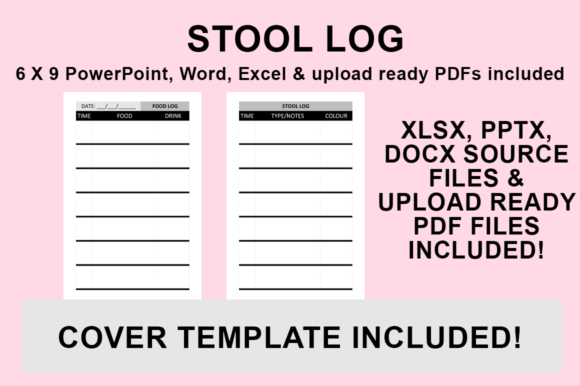
Understanding the technical parameters of your KDP Interior - Stool Log is vital for avoiding costly proofing errors and ensuring a high-quality physical product. These templates are specifically designed with no bleed and sized to fit 6″x9″, which is an industry-standard trim size for portable health journals. The "no bleed" specification means all content must remain within the safe zone, typically leaving a margin of at least 0.25 inches on the outer edge and additional gutter space for binding. Adhering to these constraints ensures that no text or graphics are trimmed off during manufacturing and that the log remains functional when the book is laid flat or held open.
The inclusion of a pre-formatted, upload-ready PDF provides a safety net for publishers who may not wish to make immediate changes. However, even when using the ready-made file, it is prudent to verify the dimensions against current KDP guidelines. Platform requirements can evolve, and taking ownership of the file verification process mitigates the risk of rejection. For those customizing their KDP Interior - Stool Log, maintaining the 6″x9″ canvas size throughout the editing process prevents scaling issues that can distort table grids or render text illegible in print.
Strategic Workflow for Customization and Export
Efficiency in production does not mean sacrificing quality. Establishing a standardized workflow for customizing your KDP Interior - Stool Log ensures consistency and reduces the likelihood of formatting errors. Whether you choose to edit in PowerPoint for graphical freedom, Word for typographic precision, or Excel for data structure manipulation, the export process remains the critical final step. Following a precise protocol guarantees that your customized interior translates perfectly from screen to printed page.
- Open and Customize: Launch your desired source file (PowerPoint, Word, or Excel) and implement your strategic changes. This includes updating fonts to match your brand kit, adjusting table structures to fit specific tracking needs, and adding any proprietary graphics or instructional content. Ensure all elements align with the 6″x9″ no-bleed specifications.
- Navigate to Save Options: Once your edits are complete and reviewed, go to the ‘File’ menu and select ‘Save As’. Avoid using ‘Print to PDF’ features where possible, as direct export functions often preserve metadata and vector quality better than virtual printer drivers.
- Select Destination: Choose a dedicated project folder for your KDP assets. Organizing files by project name and version number prevents confusion later, especially if you plan to create multiple variations of the KDP Interior - Stool Log for different niches.
- Choose File Format: From the ‘Save as type’ dropdown menu, explicitly select ‘PDF (.pdf)’. Do not save as a .docx or .pptx for upload, as KDP’s conversion engine may alter your carefully formatted layout. Saving directly as a PDF locks in your styling, fonts, and positioning.
- Finalize and Verify: Click ‘Save’ to generate the file. Before uploading to KDP, open the new PDF to conduct a final visual inspection. Check margins, verify that hyperlinks (if any) are removed, and ensure the file size meets platform limits. Your KDP Interior - Stool Log is now ready for upload.
Mitigating Risks Through Intentional Design
While the accessibility of editable templates lowers the barrier to entry, it also introduces risks for publishers who lack clear intent. Relying on a KDP Interior - Stool Log without defining a specific use case or audience can result in a generic product that fails to convert. A common pitfall is overcrowding the page with excessive fields in an attempt to make the log "comprehensive." In practice, users often abandon trackers that feel like chores. Strategic restraint is necessary; determine the minimum viable data set required for the user to achieve their health goal and design around that core function.
Another risk involves intellectual property and licensing. Always verify the commercial usage rights associated with your KDP Interior - Stool Log template. While you generally own the modifications you make, the underlying base design may have restrictions regarding resale or distribution of the unmodified source files. Additionally, be cautious of trademarked terms in your titles or descriptions. Using clinical terminology incorrectly can lead to account warnings or mislead consumers. Approach the customization process with the same rigor you would apply to writing original content; the template is a tool, not a substitute for market validation and compliance.
Enhancing User Experience and Long-Term Value
The ultimate measure of success for a KDP Interior - Stool Log is its utility to the end-user. A well-designed tracker facilitates behavior change, supports medical consultations, or provides peace of mind through organized record-keeping. To enhance user experience, consider adding introductory pages that explain how to use the log effectively. Instructions on coding symptoms, interpreting patterns, or integrating the log with digital health apps add significant value beyond the blank grid. These additions differentiate your product and demonstrate expertise, reinforcing the E-E-A-T principles that influence both consumer trust and search visibility.
Long-term business growth in the low-content space depends on building an ecosystem rather than publishing isolated items. Use insights gained from your initial KDP Interior - Stool Log releases to inform future products. If customers frequently ask about diet tracking alongside stool logs, create a complementary nutrition journal using the same design language. Cross-reference products in the back matter of your books to drive internal traffic. By treating the template as a scalable component of a broader health publishing strategy, you maximize the return on investment and establish a sustainable presence in a competitive marketplace.
Decision-making in self-publishing should always circle back to the reader's problem. Before finalizing your KDP Interior - Stool Log, ask whether every element on the page serves a functional purpose. Does the font size accommodate writing in small spaces? Is there enough white space to prevent visual fatigue? Are the prompts clear and unambiguous? Answering these questions honestly during the customization phase prevents negative reviews related to usability. The most successful publishers are those who view their templates not as finished goods, but as raw materials for solving specific problems with empathy and precision.